GAME AIMS
1) DEMO. TO DO...
Make seperate NPC File for launching ALL AI and all needs from.
a) change shapefile /position /inventry items
b) change RPG Dialog files
2) Sales Training / teamwork / mergers /Internal Brandbuilding Imparta style program
Sim Office. Fixed game play, but with general models. One big game, general content.
Cheap cos we RE-sell it
3) Retail training / HMS /Internal Brandbuilding Statoil style program (Lett Tjente penger, but in 3D and add all other learning module TOO that platform. Martercard sales prgram /Mastercard routines / robbery /car wash
Simulation Learning Interface. Updatable from server, way to launch lessons/or game play mode.
Cheap becauses its a re-usable platform for new content
Thursday, July 28, 2005

Thursday, July 21, 2005
Here's me and Hilde's Baby!
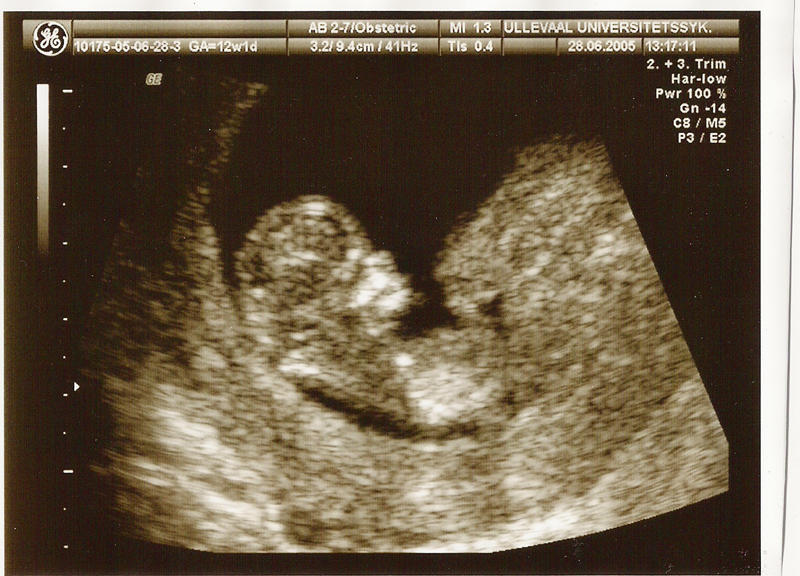
Here is me and Hildes Baby.. Looking Damn fine, if I do say so myself...
Well Heres my first post.. I would like to go to this:
http://www.aestheticsofplay.org/
Aesthetics of PlayComputer game conference at the University of Bergen, Norway OCTOBER 14 - 15, 2005
Aesthetics of Play aims to address the diversity of cultural meanings as they are expressed in computer game technology and software. The conference is hosted by the Department of Information Science and Media Studies.The notion of 'aesthetics' in this context is a broad one, encompassing the formal structures and audiovisual characteristics of games and game technologies as well as the wider epistemological, cultural and political dimensions of the gaming experience. Our aim is to contribute to the continued development of a broad cultural aesthetics of computer games, allowing us to better understand their role as mediators of cultural change.
Friday, August 03, 1990
FCB1010 Instructions
ASSIGNING BASIC EDP FUNCTIONS TO FCB1010
Assigning NOTE function midi channel to same as EDP. (Performed Once)
(ON the FCB1010 you can assign a different midi channel per function (5 x prog changes, 2 xcontrol changes 2 x expression pedals or 1x notenumbers) We will use the note numbers on the EDP)
1. Press and hold DOWN pedal while turning on the power.
2. Ensure DIRECT SELECT is enabled, Press footswitch 10 until lit. If lit do nothing.
3. Press UP
4. Select a midi function to edit. Press 10 (The Note Function)
5. Press UP
6. Use Exp pedal A to choose midi channel, Lets say 5!
7. Press UP
8. Press DOWN for at least 2.5 seconds to save and exit.
Choose your EDP Offset number
On the edp, choose your offset number.
1. Press Parameter button 3 times and multiply once
2. Default is 36. Most leave it at this, I have too, but may run into probs when you have 2 EDP's.
Assigning Note numbers to pedals for the EDP functions. (Performed once per EDP function required)
0. Choose the pedal you wish to give a function to
1. Press and hold DOWN button (to edit)
2. Press UP once (to pass another function we dont need)
3. Now all lights should be OFF except for the one we want, that it 10.
4. Press and hold pedals to switch lights off, and press and hold the 10 button to switch it ON. (The 10 button denotes the use of the Note Number function)
5. Briefly press the 10 button to choose it for editing, it should flash.
6. Press up (to edit)
7. choose the EDP function number PLUS your offset number, using the Expression pedal A.
(This seems weird I know: For Instance. Your offset = 36. Record Function = 2. Enter 38)
Heres the ones YOU want.
Record = 2
Overdub = 3
Multiply = 4
Insert = 5
Undo = 7
NextLoop = 8
But you NEED, I promise...
SUS Replace = 21
Heres another for Instance: YOUR offset ??? Lets say 12 + NextLoop = 8 YOU USE 20!!
8. Press UP to exit editing that button
9. Press DOWN for 2.5 seconds or more to SAVE and EXIT.
10. Repeat for each function on a different pedal.